Eink.JS
A physics-aware prototyping framework for designing interactions and animations on e-ink displays.
Context
E-ink is one of the most interesting display mediums to design for and one of the hardest to prototype on. E-ink displays refresh slowly, but speed is only one of the parameters that affects an animation or transition. Waveform modes determine how pixels move between states. Ghosting accumulates across interactions. Temperature affects transition timing.
Standard prototyping tools don’t model any of this well. A transition that feels polished in Figma or a browser prototype can feel muddy, awkward or broken on a real device. So teams often learn the most important interaction constraints too late, after engineering time has already been spent.
I built Eink.js to close that gap.
Disclaimer
This project does not use proprietary Kindle or Amazon-specific values. It is based entirely on public information and was developed with help from Claude.
The Problem
I design for Kindle, where the gap between prototype behavior and device behavior is impossible to ignore. You design something, hand it to engineering, review it on a real device and something feels off. The refresh is too slow. The animation leaves ghosting behind. The transition that looked smooth on a laptop feels jarring on a Paperwhite.
The loop becomes: design, build, review on device, adjust, repeat. This workflow is slow, expensive and hard to share.
More importantly, it exists because the current tools designers use have no real model of what e-ink actually does.
My goal with eink.js was not to create a perfect hardware simulator. It was to build something faithful enough to help designers and engineers make better decisions earlier in the design process.
Inspiration
Part of the inspiration for eink.js came from Framer.js and the feeling that prototyping could be both expressive and immediate.
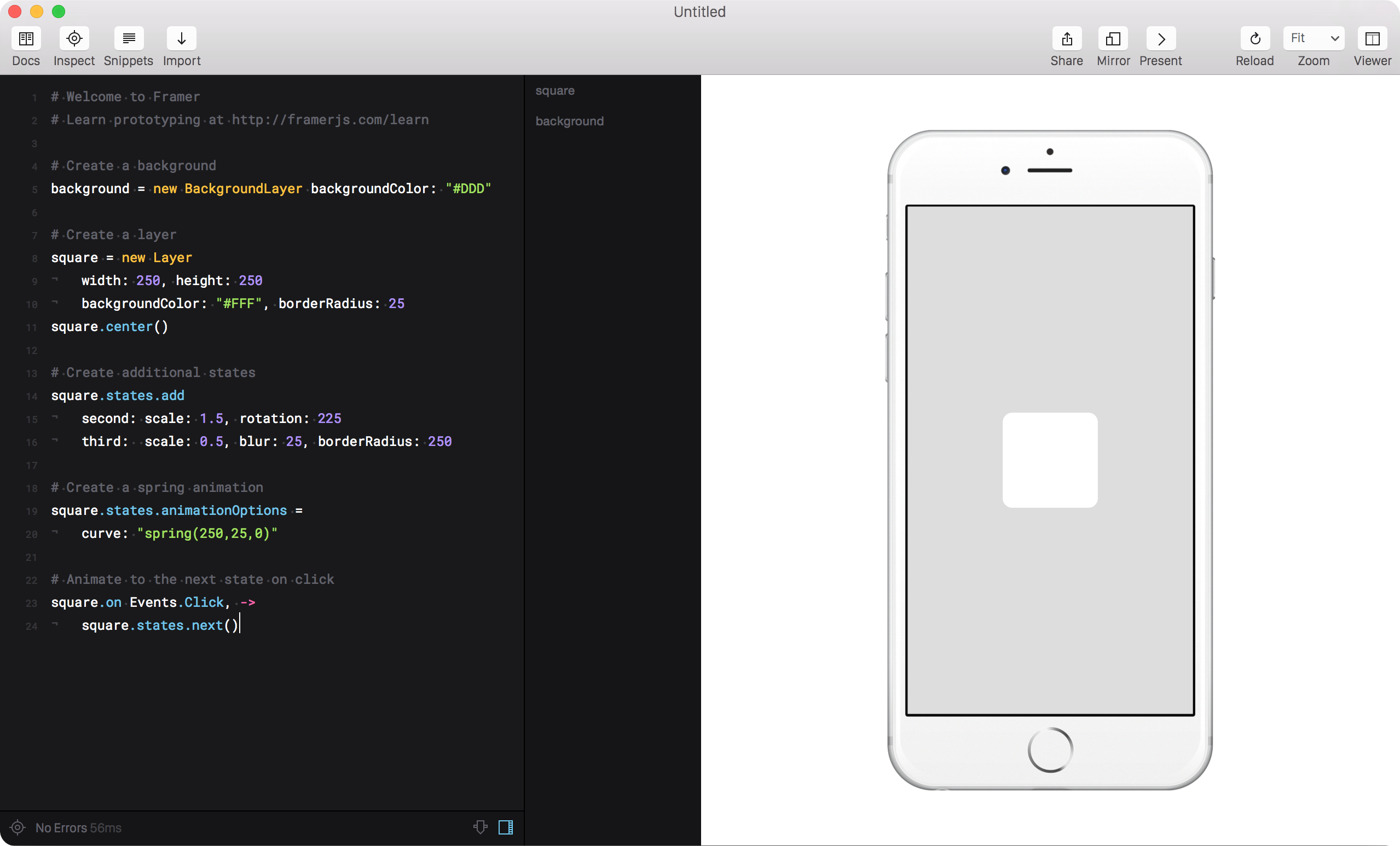
What Framer did especially well was make interaction design feel programmable without feeling heavy. You could write a simple gesture handler, chain a few animations together and quickly get to something that felt alive. The combination of creative control and low friction shaped how I thought about this project.
I wanted eink.js to bring some of that spirit to e-ink: a tool where behavior is easy to sketch, interactions are easy to iterate on and the underlying physics of the display are part of the creative material rather than an implementation detail discovered later.
What I Built
eink.js is a TypeScript framework for prototyping animation and interaction with e-ink-specific display physics in mind. It gives designers and engineers a playground where they can preview how motion and feedback could behave and explore possibilities that would otherwise require a long feedback loop.
The framework currently has three parts:
@eink/core
A physics engine that models device-specific behavior such as waveform timing, ghost accumulation, temperature-sensitive refresh changes, and display modes like A2, REAGL, and GL16.
Each waveform mode is suited for a particular kind of transition and it directly affects what kind of animations can be run with those waveforms.
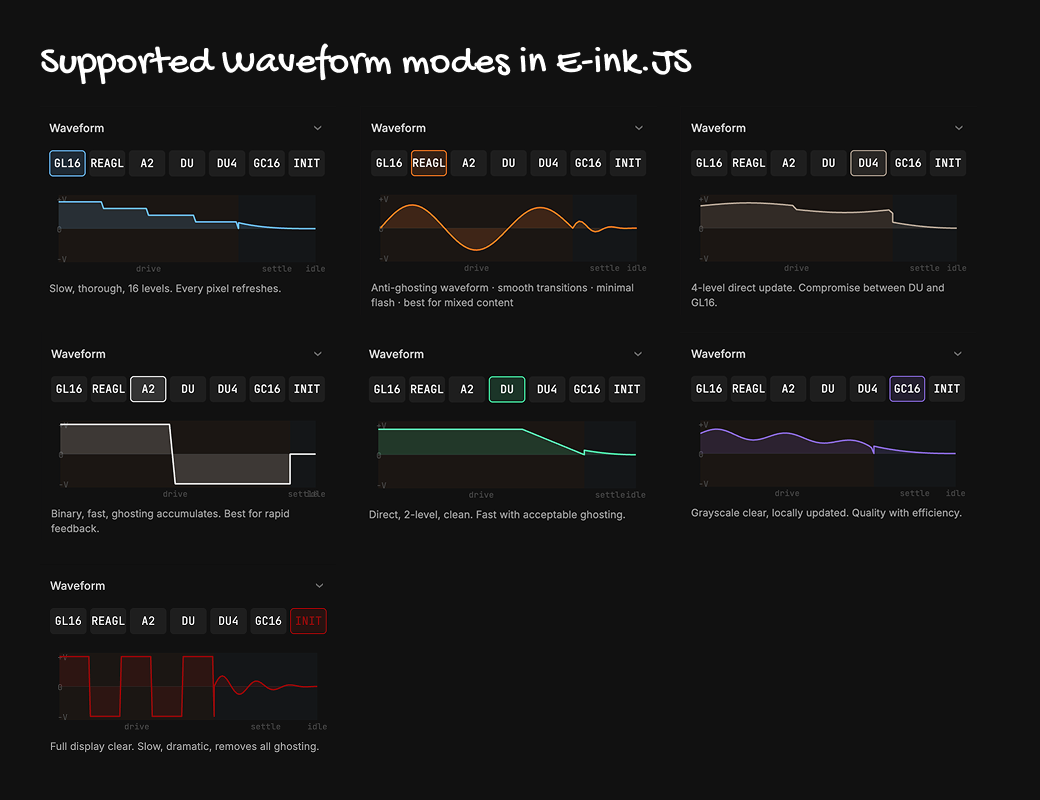
@eink/debug-panel
A visual control surface for inspecting the system in real time. Designers can adjust waveform mode, temperature, FPS and ghosting conditions and immediately see how those changes affect the feel of an interaction.
The library includes 11 preset animation modules that can be switched through the debug panel. All animations can be controlled and tweaked live. Here’s an example of the typewriter and slide lock animation.
@eink/interactions
A gesture layer designed specifically for e-ink surfaces, exploring what tap, swipe, pull and other gestures should feel like when latency and display constraints are part of the interaction model.
Designing with E-ink.JS
Refresh Modes and Timing
E-ink displays don’t have one rendering behavior. They have multiple waveform modes, each with a different balance of speed and fidelity. Faster modes refresh quickly but sacrifice grayscale quality and accumulate ghosting. Higher-quality modes preserve detail but take longer and may visibly flash the screen during transitions.
In eink.js, those waveform modes don't just change speed with artificial delays. They change the feel of the animation itself.
Comparison of a fade-dither animation across A2, REAGL and DU4 waveforms
Ghost Accumulation
Ghosting is one of the defining qualities of e-ink and it doesn’t build up evenly. It accumulates pixel by pixel depending on where the display is changing most.
eink.js tracks ghosting spatially and surfaces that behavior in the debug panel, so you can see when an interaction pattern is likely to create problems before it ever runs on a device. It is not a perfectly accurate hardware model. The purpose of the library is to make ghosting parameters and their effects visible early in the design process.
Designing interactions
The core eink.js library can also be used to prototype interactions that feel native to e-ink surfaces.
This matters because many interaction patterns we take for granted on phones were designed for bright, high-refresh displays with continuous visual feedback. On e-ink, those same patterns can feel noisy, sluggish or simply wrong when ported over directly.
Rather than reproducing mobile behavior exactly, I used the framework to explore how familiar interactions could be reinterpreted for a medium with slower refresh, visible state transitions and tighter feedback constraints.
The goal of @eink/interactions is to design gesture primitives that acknowledge those constraints instead of fighting them and to give designers a calibration environment where they can tune sensitivity, feedback and response timing before handing anything off to engineering.
Pull to Refresh
Pull to refresh is a good example of an interaction that needs to be rethought for e-ink.
On a phone, this pattern often relies on continuous animation: smooth pulling, fluid progress feedback, and an active spinner once refresh begins. On e-ink, that kind of constant visual motion is expensive and quickly starts to feel unstable.
So instead of continuous feedback, I explored a more discrete model. The interaction communicates progress through staged visual states that still preserve the feeling of pulling and release, without depending on constant motion. The result is a refresh interaction that feels more deliberate and more compatible with the medium.
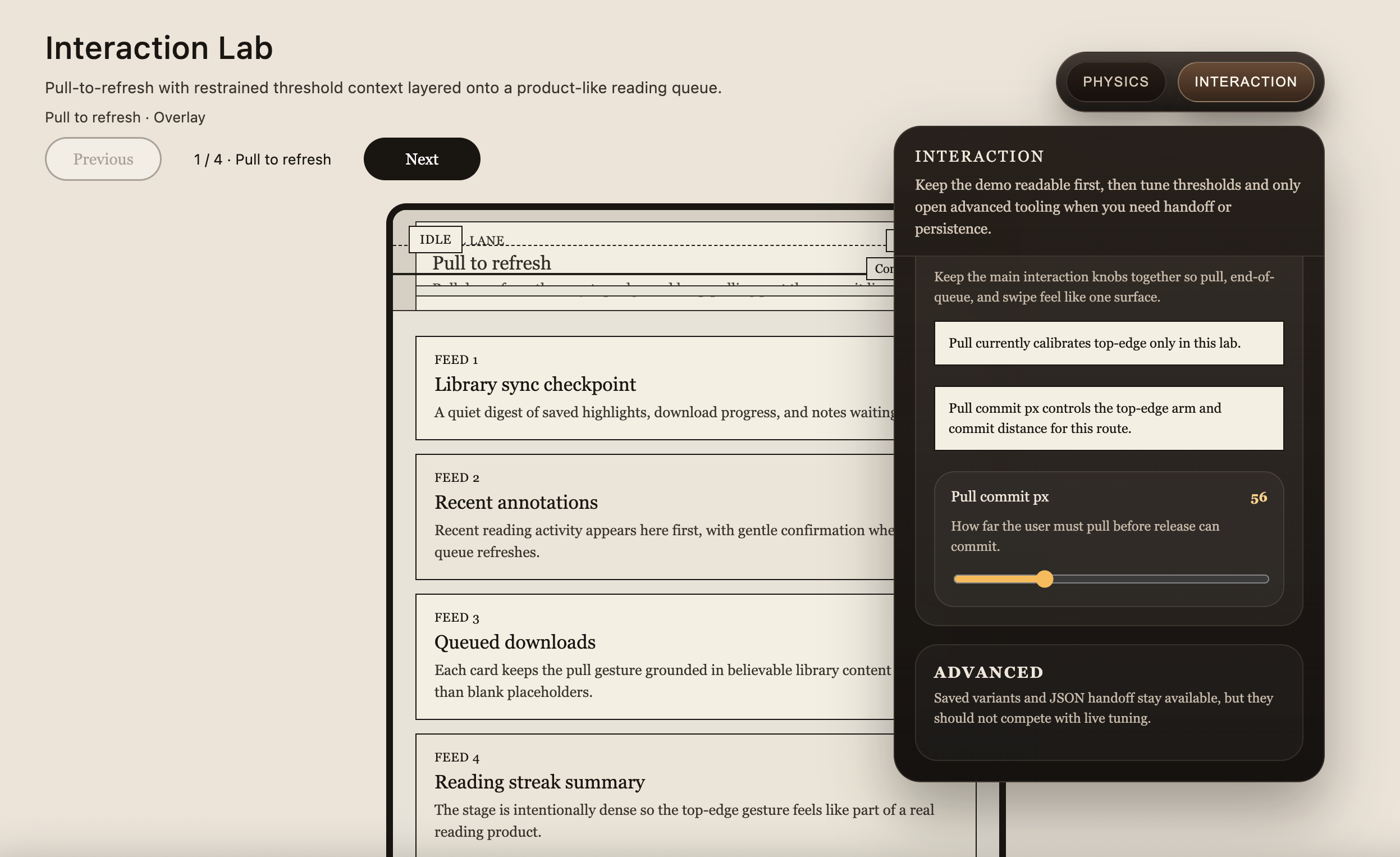
Just as important, the goal wasn’t to land on a single version and stop there. Designers need a way to tune the mechanics and visually see how their interactions are getting triggered. The interaction lab provides a visible overlay panel that showcases the triggers.
The interaction panel exposes controls for when the state changes, how much pull is required, how release should feel, and how feedback should be paced. Designers can adjust and compare the behavior in real time.
Rubber Banding
Rubber banding is another interaction pattern that does NOT exist on e-ink.
On phones, overscrolling usually creates a stretchy, spring-like effect. The interface deforms continuously as you pull, giving immediate feedback through motion and resistance. That works well on fast displays, but it breaks down on e-ink where continuous deformation is harder to render cleanly and can quickly feel visually noisy.
Instead of trying to mimic the exact physics of a phone, I explored other ways to communicate boundary and resistance. One direction was to use tonal or overlay-based feedback to signal tension and limit, creating a sense of pushback without relying on fluid stretch animation.
This turns the interaction from a direct imitation of mobile rubber banding into something more appropriate for the medium that is clearer, more stable and still expressive enough to communicate that the user has reached the edge.
As with pull to refresh, the important part is not just the final behavior but the ability to tune it. The interaction panel makes it possible to adjust thresholds, feedback intensity, and transition behavior until the response feels right.
AI Assisted Prototyping
A newer part of the project is AI reference documentation, which lets someone build with eink.js by talking to an agent instead of reading API docs line by line.
If the framework has a strong mental model and well-structured reference material, a designer or engineer should be able to describe an interaction in natural language and have an agent help generate or refine the prototype. This lowers the barrier to entry and makes the system more usable for people who want to explore ideas without manually wiring everything up first.
This matters to me because it shifts the framework from code library toward creative tool. Someone can describe a gesture, an animation or a display condition and start building without ever touching a line of code themselves.
From Playground to Real UI
The physics engine also runs in headless mode, which means it can drive real interfaces beyond canvas demos. Instead of limiting the tool to a playground, the same behavioral model can power DOM-based prototypes or production UI.
That was an important design decision. I didn't want this to be a simulation trapped in a demo environment. I wanted it to become a bridge between exploration and implementation.
Why This Project Matters to Me
This project started as a workflow fix, but it became more interesting than that. The more I worked on it, the more I felt that e-ink was being treated as a worse LCD instead of a medium with its own interaction character.
I built eink.js to make that character visible.
What interests me most about this project is that it enables designers to explore which kinds of motion feel native to this medium, which interactions stay legible under degraded conditions, and how feedback should change when responsiveness is constrained.
That’s the design space I’m drawn to: system behavior that is complex, partially invisible, and easy to misjudge with conventional tools.
Eink.JS isn’t publicly available yet — if you’d like to play with it, get in touch.